How do I pay for my order?
Mixam offers multiple payment options to make checkout easy.
- Fill in your Billing and Delivery details in your order’s Details tab.
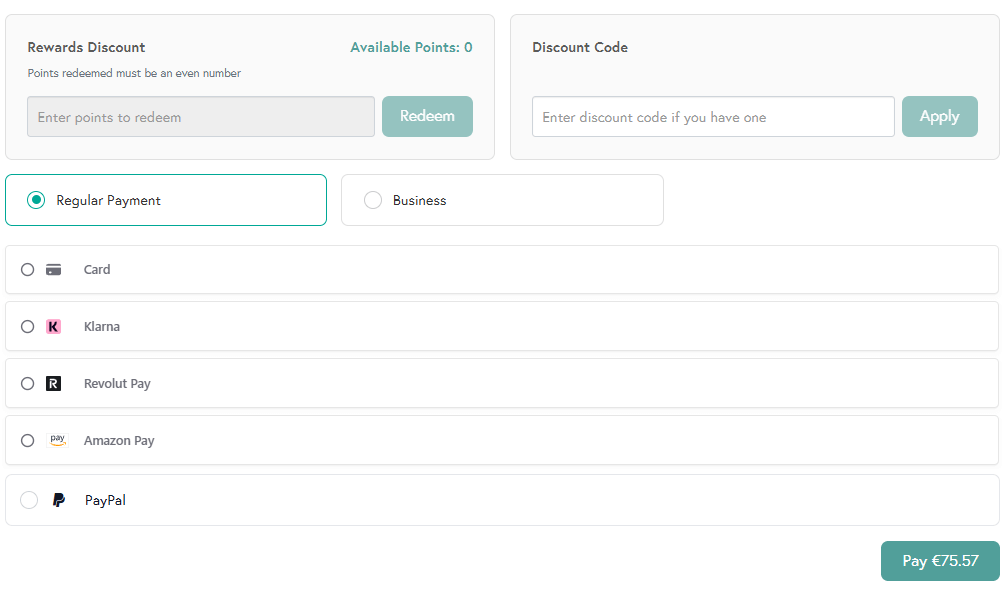
- Select your preferred payment method in the Payment tab, or pay with points via Mixam Rewards. Depending on the method, payment may be taken instantly or authorised and later captured when your order enters production.
- Once paid, confirm your order at the top of the screen. A print expert will review your files before sending them to production.
What is a payment authorisation?
A payment authorisation is a request sent to your bank to approve a pending payment. Depending on your bank, region, and payment method, the authorisation may temporarily reduce your available balance (for debit accounts) or available credit (for credit accounts) until the payment is completed. Once authorised, the payment tab will show a blue checkmark.
What is a payment capture?
Payment capture is the transfer of funds that were previously authorised. It happens when your order enters production. Your available balance or available credit is reduced, and your bank account is debited. Once authorised, the payment tab will show a green checkmark.
When will I be charged?
Your payment depends on your chosen method and order status:
Pending Action (Bank Transfer, Proforma Invoice, PayPal): You approve, or a third party processes the payment.
On Production(Debit/Credit Card, Google Pay, Amazon Pay, Revolut): Payment is authorised and shows as pending. Your card is charged when the order enters production.
Note: Increasing your order value requires new approval, and decreasing your order value does not.
Authorisation limits:
- Debit/Credit Card (30 days)
- Google Pay (30 days)
- Amazon Pay N/A
- Revolut Pay N/A
If your order is not confirmed for production within the specified time, we will send you an expiry reminder or request a new payment.
Payment Options
Our pricing is fully transparent. Once your order enters production and funds are captured, you will receive a payment confirmation email with your invoice. The PDF invoice is also available in your Payment tab and My Invoices tab in your account.
Invoices
Registered businesses can select ‘Proforma Invoice’ in their order's Payment tab. We’ll email it to you within 1 working day (check your Spam/Junk folder). It lists the items we’ll send once payment is received. We only accept bank transfers, and unpaid invoices may affect your estimated date.
Payment Troubleshooting
If you experience payment issues, contact our team of print experts or reference the links below:
How To Reorder Prints
Mixam account holders can reorder prints. Log in, and in your Order History tab, locate the relevant order and click the Reorder button. You can then amend the quantity, other details and confirm your order. If you placed an order but don’t have an account, contact our print experts and provide your order number so we can arrange a reorder. Remember to review your proofs and order details, particularly if your address(es) has changed. We’ll send your order to production once it’s paid for and confirmed.